
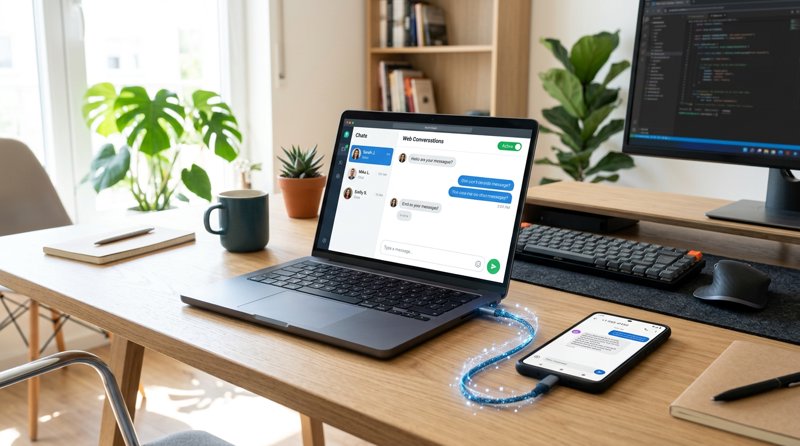
In today's fast-paced business world, effective client communication is paramount. Many businesses need to text clients from desktop using phone numbers for convenience, professionalism, and cost-efficiency. MySMSGate offers a powerful yet simple solution, transforming your Android phone into a robust SMS gateway that lets you manage all your client text messages directly from your computer.
The Modern Challenge: Why You Need to Text Clients from Desktop Using Your Phone
For small businesses, freelancers, and growing startups, staying connected with clients is non-negotiable. Whether it's sending appointment reminders, order updates, promotional offers, or simply quick customer support replies, SMS remains one of the most direct and effective communication channels. However, relying solely on your mobile phone for all client texting can quickly become cumbersome:
- Lack of Efficiency: Typing lengthy messages on a small phone screen is slow and prone to errors.
- Disjointed Communication: Juggling personal and business texts on one device can lead to missed messages or unprofessional replies.
- Limited Visibility: Without a centralized dashboard, tracking conversations, managing multiple clients, or collaborating with team members becomes a nightmare.
- Cost and Compliance: Traditional SMS gateways can be expensive, often involving per-message fees, monthly subscriptions, and complex sender registration processes like 10DLC in the US, which adds significant overhead and delays.
The ideal solution combines the convenience of desktop management with the reliability and cost-effectiveness of your own phone's SIM card. This is precisely where MySMSGate steps in, empowering you to effortlessly text clients from desktop using phone hardware you already own.
Introducing MySMSGate: Your Personal, Cloud-Powered SMS Gateway
MySMSGate is an innovative SMS gateway SaaS designed to bridge the gap between desktop convenience and mobile phone functionality. It transforms your Android smartphone into a dedicated SMS sending and receiving device, all managed through an intuitive web dashboard or a simple REST API. This means you can:
- Utilize Your Existing SIM Cards: Leverage your current mobile plan and numbers, avoiding the need for new virtual numbers or costly carrier registrations (like 10DLC).
- Send and Receive from Desktop: Manage all your client communications directly from your computer, enjoying a full keyboard and a clear interface.
- Benefit from Cost Savings: With MySMSGate, you pay a flat, low rate per SMS (starting at $0.03/SMS), with no monthly fees or hidden charges, making it significantly more affordable than traditional providers.
- Ensure Reliability: Your messages are sent via your physical SIM, often leading to better delivery rates for local recipients compared to some virtual numbers.
MySMSGate is built for practicality and cost-consciousness, making it the perfect tool for small businesses, indie developers, and multi-branch operations looking to streamline their client texting.
Key Features for Seamless Desktop SMS Communication
MySMSGate offers a robust set of features tailored for businesses and developers who want to text clients from desktop using phone capabilities:
- Web Conversations: A chat-like interface in your browser allows you to send and receive SMS messages from your computer, mirroring the experience of a modern messenger app but with your real phone numbers.
- Multi-Device Support: Connect unlimited Android phones to a single MySMSGate account. This is ideal for businesses with multiple branches, each with its own local number, or for managing different communication lines from a central dashboard.
- Dual SIM Functionality: If your connected Android phone has dual SIM support, MySMSGate allows you to choose which SIM slot to send from, giving you maximum flexibility and control over your outgoing messages.
- Incoming SMS Forwarding: All messages received on your connected Android phones are automatically forwarded to your web dashboard, ensuring you never miss a client reply.
- No Sender Registration (No 10DLC): A significant advantage, especially for US-based businesses. Since messages are sent directly from your own phone's SIM card, MySMSGate bypasses the complex and costly 10DLC registration process and ongoing fees required by many traditional SMS providers.
- Simple REST API: For developers, a straightforward API (a single
POST /api/v1/sendendpoint) allows for easy integration into existing applications, CRMs, or automation workflows. - Real-time Delivery Tracking: Get instant status updates on your messages via webhooks, ensuring you know exactly when your client receives your text.
- QR Code Setup: Connecting your phone is effortless. Just scan a QR code from your dashboard with the MySMSGate Android app – no manual API key entry required.
- Failed SMS Refund: MySMSGate automatically refunds your balance for any messages that fail to deliver, so you only pay for successful transmissions.
How MySMSGate Works: From Setup to Sending
The process of setting up and using MySMSGate to text clients from desktop using phone is designed to be straightforward for everyone, regardless of technical expertise. Here’s a quick overview:
- Create Your Account: Sign up at mysmsgate.net to get your unique API key and access to your personal dashboard.
- Install the Android App: Download and install the MySMSGate app on your Android smartphone. This app acts as the bridge between your phone's SIM card and the MySMSGate cloud platform.
- Connect Your Phone: From your MySMSGate web dashboard, a QR code will be displayed. Open the MySMSGate app on your phone and scan this QR code. Your phone will instantly connect to your account, ready to send and receive messages.
- Send SMS from Desktop: Use the intuitive Web Conversations interface in your browser to send messages. Simply type your message, choose the connected phone and SIM slot (if applicable), and hit send. The message is routed through MySMSGate's cloud to your connected Android phone, which then sends it via its SIM card to your client.
- Receive SMS on Desktop: When a client replies, your Android phone receives the message and forwards it instantly to your MySMSGate web dashboard, appearing directly in your Web Conversations interface.
For developers, the process is similar for setup, but instead of the web dashboard, you interact with the powerful REST API to programmatically send and receive messages.
Step-by-Step: Setting Up MySMSGate to Text Clients from Desktop
Ready to streamline your client communications? Follow these simple steps to start texting clients from your desktop using your Android phone with MySMSGate.
Step 1: Create Your MySMSGate Account
The first step is to establish your MySMSGate account. This is quick, free, and gives you immediate access to your dashboard and API key.
- Navigate to the MySMSGate registration page.
- Enter your email address and create a secure password.
- Confirm your email address.
Once registered, you'll be redirected to your personal dashboard, where you'll find your unique API key and the QR code needed for phone connection.
Step 2: Install the MySMSGate Android App
Your Android phone is the backbone of the MySMSGate system. The dedicated app ensures a stable connection and handles message routing.
- On your Android phone, open the Google Play Store.
- Search for 'MySMSGate' and install the official app.
- Once installed, open the app.
Step 3: Connect Your Phone via QR Code
This is the magical step that links your phone to your MySMSGate account, making it ready to send and receive SMS from your desktop.
- From your MySMSGate web dashboard (on your desktop), locate the 'Connect Device' section. You'll see a unique QR code.
- In the MySMSGate Android app on your phone, tap the 'Scan QR Code' option.
- Point your phone's camera at the QR code on your desktop screen. The app will instantly connect.
Your phone is now connected! You'll see its status as 'Online' in your MySMSGate dashboard.
Step 4: Start Texting Clients from Your Desktop
With your phone connected, you can immediately begin using the Web Conversations feature.
- In your MySMSGate web dashboard, navigate to the 'Web Conversations' section.
- Click 'New Conversation' or select an existing one.
- Enter your client's phone number or select from your contacts.
- Type your message in the chat interface.
- (Optional) If you have multiple phones or dual SIMs, select the desired sending device and SIM slot.
- Click 'Send'. Your message will be sent through your connected Android phone.
All replies will appear in real-time within the Web Conversations interface.
Step 5: (Optional) Integrate with Your Systems via API
For advanced users and developers, MySMSGate's simple REST API allows you to programmatically send SMS from your applications or integrate with automation tools like Zapier and Make.com.
- Access your API key from your MySMSGate dashboard.
- Refer to the API documentation for detailed instructions.
- Explore our integration guides for Python, Node.js, PHP, Go, Ruby, Zapier, Make.com, and n8n to connect MySMSGate with your existing workflows.
Developer's Corner: Programmatically Text Clients from Desktop
For developers who need to integrate SMS capabilities into their applications, MySMSGate provides a clean and simple REST API. This allows you to programmatically text clients from desktop using phone resources, automating communications like never before.
The core of the API is a single POST endpoint for sending messages:
POST /api/v1/send HTTP/1.1
Host: mysmsgate.net
Content-Type: application/json
Authorization: Bearer YOUR_API_KEY

{
    "device_id": "YOUR_DEVICE_ID",
    "number": "+1234567890",
    "message": "Hello from MySMSGate!"
}
Here are quick examples in popular programming languages:
Python Example
import requests

api_key = "YOUR_API_KEY"
device_id = "YOUR_DEVICE_ID" # Find in your dashboard
recipient_number = "+1234567890"
message_text = "Hello from MySMSGate Python!"

url = "https://mysmsgate.net/api/v1/send"
headers = {
    "Authorization": f"Bearer {api_key}",
    "Content-Type": "application/json"
}
data = {
    "device_id": device_id,
    "number": recipient_number,
    "message": message_text
}

try:
    response = requests.post(url, headers=headers, json=data)
    response.raise_for_status() # Raise an exception for HTTP errors
    print("SMS sent successfully:", response.json())
except requests.exceptions.RequestException as e:
    print(f"Error sending SMS: {e}")
Node.js Example
const axios = require('axios');

const apiKey = 'YOUR_API_KEY';
const deviceId = 'YOUR_DEVICE_ID'; // Find in your dashboard
const recipientNumber = '+1234567890';
const messageText = 'Hello from MySMSGate Node.js!';

async function sendSms() {
  try {
    const response = await axios.post(
      'https://mysmsgate.net/api/v1/send',
      {
        device_id: deviceId,
        number: recipientNumber,
        message: messageText,
      },
      {
        headers: {
          Authorization: `Bearer ${apiKey}`,
          'Content-Type': 'application/json',
        },
      }
    );
    console.log('SMS sent successfully:', response.data);
  } catch (error) {
    console.error('Error sending SMS:', error.response ? error.response.data : error.message);
  }
}

sendSms();
MySMSGate also supports webhooks for real-time delivery tracking, allowing your applications to react to message status updates (e.g., delivered, failed).
Cost-Efficiency and Advantages Over Traditional SMS Providers
When it comes to communicating with clients, cost and reliability are critical. MySMSGate stands out by offering a highly competitive pricing model and unique advantages, especially when compared to traditional SMS gateways like Twilio or Vonage.
| Feature | MySMSGate | Twilio (Programmable SMS) | SMSGateway.me |
|---|---|---|---|
| Pricing Model | $0.03/SMS (no monthly fees) | $0.05 - $0.08/SMS (plus monthly fees for numbers) | $9.99/month + SMS costs |
| Sender ID/Registration | Your own phone's SIM (no 10DLC, no carrier approval) | Requires 10DLC registration (US), virtual numbers, carrier approval | Uses shared numbers or requires registration |
| Monthly Fees/Contracts | None | Monthly fees for virtual numbers | $9.99/month minimum |
| Failed SMS Refund | Yes, automatic balance refund | No, generally charged regardless of delivery | No |
| Setup Complexity | QR code scan (minutes) | API keys, configuration, 10DLC registration (days/weeks) | API keys, configuration |
| Dual SIM Support | Yes | N/A (virtual numbers) | N/A (virtual numbers) |
| Primary Use | Cost-effective, personal number, desktop management | Enterprise-grade, global scale, virtual numbers | Similar concept, but with monthly fee |
As you can see, MySMSGate's model of leveraging your existing Android phone and SIM card provides unparalleled cost savings and simplicity. For instance, sending 1,000 SMS messages with MySMSGate costs just $20 (with a 1000 SMS package), with no ongoing monthly commitments. Compare this to Twilio, where a similar volume would cost significantly more due to per-message rates, plus potential monthly fees for dedicated numbers and the overhead of 10DLC compliance.
This makes MySMSGate an excellent alternative to Twilio and other providers, particularly for businesses that value using their own local numbers and avoiding complex regulatory hurdles.
Real-World Use Cases for Texting Clients from Desktop Using Your Phone
The ability to text clients from desktop using phone numbers opens up a world of possibilities for efficient and personalized communication across various industries and business types:
- Appointment Reminders: Dentists, salons, consultants, and clinics can send automated or manual reminders directly from their front desk computer, reducing no-shows and improving scheduling efficiency.
- Order Confirmations & Updates: E-commerce businesses or local delivery services can keep customers informed about their order status, shipping updates, or delivery times without needing expensive third-party integrations.
- Customer Support: Provide quick, responsive support. Agents can handle multiple client conversations from a desktop interface, accessing client history and responding promptly, enhancing customer satisfaction.
- Local Business Outreach: Restaurants, retail stores, or service providers can send targeted promotions, event invitations, or loyalty program updates to their local customer base using a familiar local number.
- Multi-Branch Management: Businesses with several locations can connect a phone from each branch to MySMSGate. All incoming and outgoing SMS can be managed from a central desktop dashboard, while messages are still sent from the local branch's number.
- Freelancers & Consultants: Manage client communications professionally without mixing them with personal texts on your phone, maintaining a clear separation while using your primary business number.
- OTP & Verification (Small Scale): For internal systems or smaller user bases, MySMSGate can be used to send One-Time Passwords (OTPs) or verification codes, leveraging its API for simple, cost-effective authentication.
Each of these scenarios benefits from MySMSGate's combination of desktop convenience, cost-effectiveness, and the ability to use your own trusted phone number.
Frequently Asked Questions
Here are some common questions about using MySMSGate to text clients from your desktop.
Can I use multiple phones to text clients from my desktop?
Yes, absolutely! MySMSGate supports connecting an unlimited number of Android phones to a single account. This is perfect for multi-branch businesses or individuals who manage several distinct communication lines. You can select which phone and even which SIM slot (if dual SIM) to send from within the Web Conversations interface or via the API.
Do I need to register for 10DLC or obtain carrier approval?
No, one of MySMSGate's significant advantages is that you do not need to register for 10DLC or obtain specific carrier approval. Since messages are sent directly from your own Android phone's SIM card, they are treated as regular person-to-person (P2P) messages, bypassing these complex and costly requirements.
What happens if an SMS fails to deliver?
MySMSGate has a built-in refund policy for failed SMS. If a message you send does not successfully deliver to the recipient (e.g., due to an invalid number or network issue), your MySMSGate balance for that specific message will be automatically refunded. You only pay for successfully delivered messages.
How secure is MySMSGate for client communications?
MySMSGate uses industry-standard encryption and secure protocols to transmit your messages between your desktop, the MySMSGate cloud, and your Android phone. Your API key should be kept confidential, and your phone should be secured like any other business device. While the content of the SMS itself is transmitted over cellular networks, the platform ensures the integrity and privacy of the routing process.
Can I receive replies from clients on my desktop?
Yes, any SMS messages sent by your clients to your connected Android phone's number will be automatically forwarded to your MySMSGate web dashboard in real-time. You can view and reply to these messages directly from your desktop using the Web Conversations interface, creating a seamless chat experience.


Comments (0)
Be the first to comment!